In today’s fast-paced legal environment, managing and organizing client documents efficiently is critical. Traditional methods of collecting case files, medical records, insurance statements, and other supporting documents are time-consuming and prone to errors. Law Practice AI’s Document Collector offers a revolutionary solution to streamline the entire process. By centralizing document intake, automatically extracting key data, and securely storing all case-related files, legal teams can focus on what truly matters—building stronger cases and generating accurate demand letters. This AI-powered tool ensures that every document is captured, categorized, and easily accessible, saving hours of manual work and reducing the risk of lost or incomplete files.
With Law Practice AI, law firms, paralegals, and attorneys can automate the tedious task of document collection while maintaining compliance with data privacy standards. The platform supports multiple file types, integrates with existing legal software, and allows for bulk uploads, ensuring no critical information is overlooked. By adopting this system, legal teams can increase productivity, maintain accuracy, and accelerate the demand letter preparation process. Don’t let manual document collection slow you down—get started with Law Practice AI Document Collector today.
Why Document Collection is Crucial in Legal Practice
Efficient document collection is the backbone of successful legal work. Missing or mismanaged files can lead to delays, errors, and even financial loss for clients. Every case—from personal injury to lemon law claims—requires a detailed set of evidence, including medical records, police reports, client statements, contracts, and more. Law Practice AI Document Collector ensures that every piece of evidence is systematically captured and stored in a secure, organized manner. Legal teams no longer need to spend hours tracking down documents or manually entering information into spreadsheets or case management systems.
By automating the collection process, the Document Collector minimizes human errors, ensures compliance with regulations like HIPAA, and maintains a clear audit trail. It also allows attorneys to quickly retrieve any required document, review it for case preparation, and feed relevant information directly into demand letters. This not only saves valuable time but also improves the overall quality and reliability of legal documents. Upgrade your document workflow with Law Practice AI today and experience effortless case management
How Law Practice AI Document Collector Works
The workflow of Law Practice AI Document Collector is designed to be intuitive and highly effective. First, users upload all relevant case documents, whether they are PDFs, Word files, images, or emails. The AI engine then automatically extracts key details such as client information, dates, damages, and policy numbers. Once processed, the system categorizes files based on case type, priority, and relevance, making retrieval simple and fast.
The platform also integrates with existing legal software and cloud storage systems, allowing seamless import and export of documents. Users can track the status of each file, set reminders for missing documents, and generate reports showing which records are pending, approved, or ready for demand preparation. This structured approach eliminates manual sorting and reduces the risk of errors. With Law Practice AI, attorneys can efficiently gather, validate, and prepare all case documentation with confidence. Sign up today to simplify your document collection process and accelerate your legal workflow.
Key Features of Document Collector
Law Practice AI Document Collector is loaded with features designed to make legal documentation effortless:
Automated Data Extraction: Pulls critical information from all uploaded documents with AI precision.
Secure Storage: All files are stored with SOC 2 and HIPAA-compliant encryption.
Bulk Uploads: Upload hundreds of files at once without any risk of misplacement.
Real-Time Tracking: Monitor which documents are collected, pending, or incomplete.
Integration Ready: Works seamlessly with case management software for easy document flow.
Each feature ensures that legal teams can focus on case strategy rather than manual paperwork. By reducing errors and speeding up the document intake process, the Document Collector directly supports faster demand letter generation. Experience the full power of automated document management with Law Practice AI—book a demo today.
Benefits of Using Documents Collector
Using the Law Practice AI Document Collector brings tangible benefits to law firms and legal professionals:
Time Savings: Automate repetitive task and reduce manual data entry.
Enhanced Accuracy: Eliminate human mistakes and ensure all details are captured correctly.
Compliance Assurance: Maintain secure records that meet regulatory standards.
Centralized Management: All case files stored in one oraganized location.
Improved Client Service: Quickly access and provide documentation to clients when needed
These benefits not only improve internal workflows but also positively impact client satisfaction. Legal teams can prepare demand letters faster, submit accurate claims, and reduce back-and-forth delays. Start transforming your document management system with Law Practice AI today.
Use Cases: When Document Collector Makes a Difference
Personal Injury Cases: Gather medical records, accident reports, and witness statements quickly.
Lemon Law Claims: Collect repair history, purchase documents, and correspondence with manufacturers.
Insurance Bad Faith: Organize policy documents, claim forms, and communication logs efficiently.
Slip & Fall Claims: Upload incident reports, premises photos, and witness accounts seamlessly.
No matter the case type, Law Practice AI Document Collectorensures that all supporting documentation is ready for use in demand letters, case summaries, or litigation support. Don’t let missing documents slow down your legal process—try Law Practice AI now.
Frequently Asked Questions (FAQs)
What types of documents can I upload?
Is my data secure?
Can I integrate with my existing legal software?
How fast can I collect all my case documents?
Can I track which documents are missing?
Do I need technical skills to use it?
Get Started with Law Practice AI Document Collector
Stop wasting hours manually managing legal documents. With Law Practice AI Document Collector, you can gather, organize, and process case files effortlessly. Accelerate demand letter preparation, reduce errors, and improve efficiency across your legal practice.
In episode 276 of the Grow Your Law Firm podcast, PILMMA founder Ken Hardison sits down with tech innovator Hamid Kohan, the visionary behind Practice AI, to discuss how AI is transforming the way law firms operate.
During the conversation, Kohan highlights how Practice AI helps firms grow their practice by automating follow-ups through intelligent calls, texts, and emails, making client communication more personal and efficient. The platform’s document summarization tool is a game changer, processing complex legal and medical documents in under five minutes.
Kohan also explains how a centralized AI solution like Practice AI reduces the need for multiple platforms by integrating with CRMs and virtual staff. This all-in-one approach streamlines intake, calendaring, matter opening, and file management while saving time and money.
The episode is a must-listen for attorneys looking to simplify operations and scale with technology. If you’re attending a PILMMA event or following the PILMMA podcast, this episode offers valuable insight into the future of legal tech.
Every plaintiff attorney has done the manual version of personal injury case valuation.
Pull the medical bills. Tally the past expenses. Estimate the future treatment costs. Apply a pain and suffering multiplier based on judgment and experience. Double-check the wage loss calculation. Hope nothing was missed.
That process works. But it is slow, it is inconsistent across attorneys, and it is entirely dependent on the person running the numbers having every document in front of them at the right time.
Personal injury case valuation software is designed to replace that manual process with a structured, data-driven output that gives attorneys a consistent starting point on every case.
This article walks through what case valuation tools actually do, how to evaluate them, and what separates a useful personal injury damages calculator from one that just produces a number your attorney cannot rely on.
KEY TAKEAWAYS
Personal injury case valuation software should pull figures from your actual case documentation, not from a generic multiplier formula applied to entered numbers.
The most important output from a case valuation tool is not a dollar figure. It is the structured breakdown of how that figure was calculated.
Personal injury law firm software used for case valuation must be HIPAA compliant before any medical records enter the workflow.
An automated case valuation tool that flags missing documentation before producing an output is significantly more reliable than one that calculates from whatever data is available.
Defining Personal Injury Case Valuation
Personal injury case valuation is the process of calculating the total compensatory damages a plaintiff is entitled to based on the documented evidence in their case file.
A complete personal injury case valuation is not a single number. It is a structured, component-by-component breakdown covering past medical expenses, future treatment costs, lost wages, pain and suffering, and property damage. Each component is drawn from verified documentation, not from estimates or averages.
The valuation forms the foundation of the settlement demand. How it is calculated, what documentation it is based on, and how each figure is supported determines whether the demand holds up under adjuster scrutiny or gives opposing counsel grounds to challenge it.
What Personal Injury Case Valuation Actually Involves
Before evaluating any software, it helps to be precise about what personal injury case valuation means in practice for a plaintiff law firm.
Case valuation is not a single calculation. It is a multi-component process that requires accurate documentation of every relevant damages category.
The Core Damages Categories
A complete personal injury case valuation covers the following:
Past Medical Expenses: Total billed amounts organized by provider, including emergency department care, specialist visits, imaging, physical therapy, and any other documented treatment. The figure is drawn from verified billing statements, not estimates.
Future Medical Expenses: Projected ongoing care costs based on treating physician recommendations. This typically includes physical therapy, specialist follow-ups, pain management, and any anticipated surgical interventions.
Pain and Suffering: Non-economic damages calculated using either a multiplier applied to total medical expenses or a per diem approach based on the duration and severity of the injury. Multipliers typically range from 1.5x to 5x total medical expenses depending on injury severity. A soft tissue case may support 1.5x to 2x, while a permanent disability case with documented long-term functional limitations may support 4x or higher.
Per diem calculations assign a daily value to the injury and multiply it by the number of days the plaintiff experienced pain and limitation. The appropriate method depends on jurisdiction, documented injury severity, and the strength of the clinical evidence.
Lost Wages: Income lost during the recovery period, documented with employer verification and pay stubs. Where applicable, future earning capacity loss is addressed with vocational expert input.
Property Damage: Vehicle repair or total loss value, documented with appraisals or repair estimates.
Why Manual Case Valuation Creates Inconsistency
When personal injury case valuation is done manually, the output depends entirely on who is running the numbers, what documentation they have in front of them, and what multiplier they choose to apply.
Two attorneys at the same firm can review the same case file and arrive at materially different valuations. That inconsistency affects settlement positioning, negotiation strategy, and ultimately client outcomes.
Personal injury case valuation software standardizes the process by applying consistent calculation logic to the same verified documentation every time.
What Case Valuation Software Actually Does
A personal injury damages calculator embedded in a plaintiff law firm workflow does more than multiply medical bills by a number.
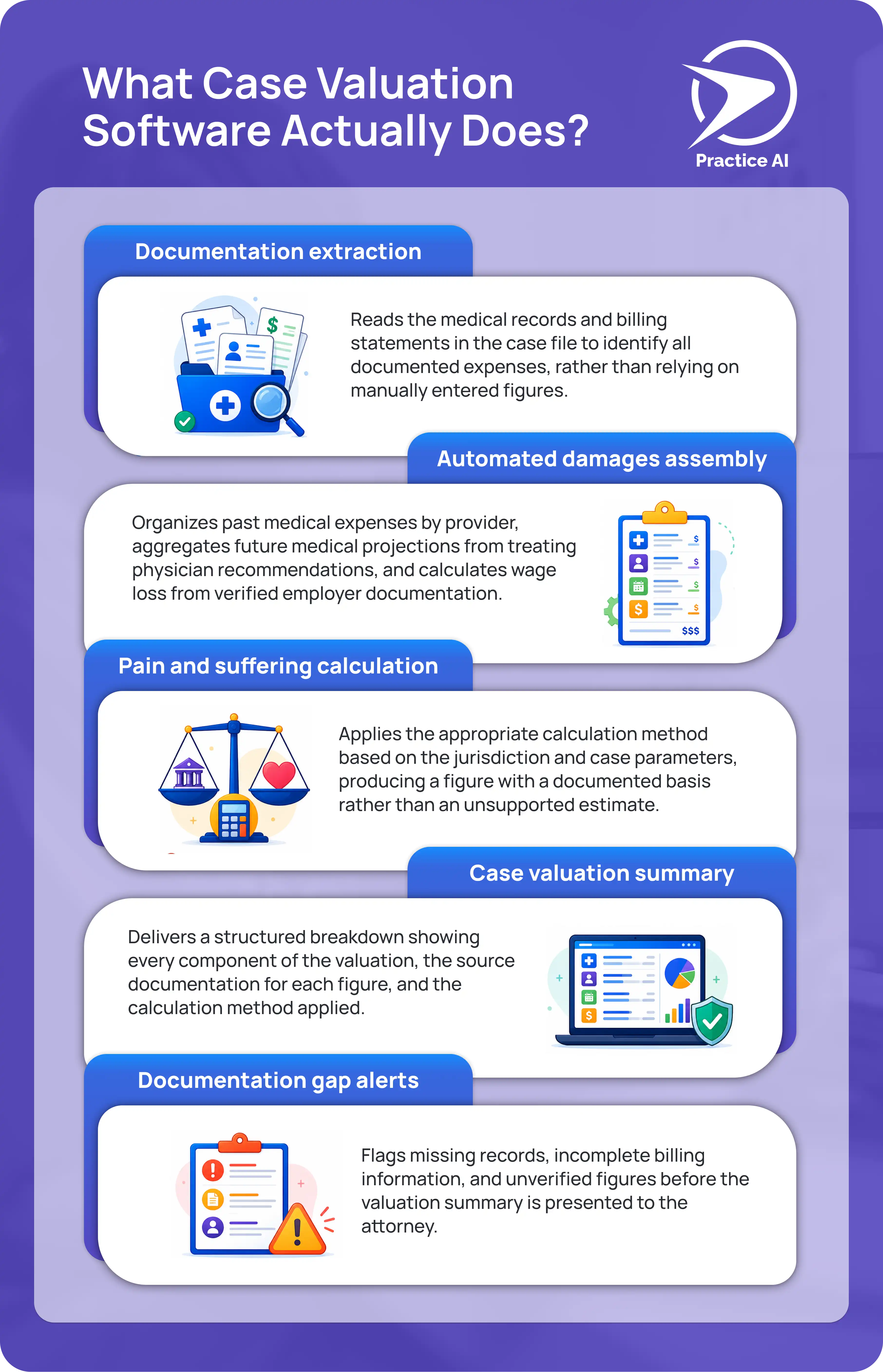
Here is what a properly built case valuation tool produces:
Documentation extraction
Reads the medical records and billing statements in the case file to identify all documented expenses, rather than relying on manually entered figures.
Automated damages assembly
Organizes past medical expenses by provider, aggregates future medical projections from treating physician recommendations, and calculates wage loss from verified employer documentation.
Pain and suffering calculation
Applies the appropriate calculation method based on the jurisdiction and case parameters, producing a figure with a documented basis rather than an unsupported estimate.
Case valuation summary
Delivers a structured breakdown showing every component of the valuation, the source documentation for each figure, and the calculation method applied.
Documentation gap alerts
Flags missing records, incomplete billing information, and unverified figures before the valuation summary is presented to the attorney.
A personal injury damages calculator that skips any of these steps is producing a number, not a valuation.
How to Evaluate Case Valuation Software for a Plaintiff PI Firm
These are the criteria that separate useful case valuation software from tools that add more steps than they remove.
1. Does It Read Your Actual Case Documents?
The most important question is whether the tool reads your uploaded case documents or asks you to enter figures manually.
A tool that accepts manual entries produces output based on what someone typed in. A tool that reads your uploaded records produces output based on what the documentation actually shows.
For personal injury case valuation, that distinction is significant. A billing total entered manually is only as accurate as the person who entered it. A billing total extracted from the uploaded provider records is verified against the source.
2. Does It Integrate With Your Legal Software?
Case valuation software that does not connect to your existing platform CASEpeer, Filevine, SmartAdvocate requires your team to re-enter information that is already in your system.
Personal injury law firm software used for case valuation should pull case data, billing records, and client information automatically. An automated case valuation that requires manual data transfer between platforms is not actually automated.
3. Does It Produce a Structured Breakdown, Not Just a Total?
A dollar figure without a breakdown is not a usable case valuation for a plaintiff attorney.
The output needs to show every component of the calculation, the source for each figure, and the method used to calculate pain and suffering. An attorney reviewing the valuation should be able to verify every line before using it to set a demand.
4. Does It Flag What Is Missing?
An automated case valuation tool that calculates from whatever documentation is available, without flagging what is missing, will produce an inaccurate valuation whenever the case file is incomplete.
The tool should identify missing provider records, unverified wage loss documentation, incomplete billing statements, and any other gaps before presenting the valuation. Catching missing documentation before the calculation runs is significantly better than discovering it after the demand letter is sent.
5. Is It HIPAA Compliant and SOC 2 Certified?
Every personal injury case file contains protected health information. Any case valuation software that processes medical records must be HIPAA compliant and SOC 2 Type II certified, with a signed Business Associate Agreement in place before any client data enters the platform.
This is not optional for plaintiff law firms. It is a baseline requirement.
6. Does Attorney Review Remain Mandatory?
No automated case valuation should produce a final figure that goes directly into a demand letter without attorney review.
The software handles the data assembly and calculation. The attorney reviews the output, adjusts where judgment requires it, and approves the final valuation before it is used. Firms using tools that skip this step are assuming professional responsibility risk they do not need to take.
General Calculator vs. Purpose-Built Case Valuation Software
Factor
General PI Calculator
Purpose-Built Case Valuation Software
Input method
Manually entered figures
Reads uploaded case documents
Damages breakdown
Total only
Component by component with sources
Legal software integration
None
Native with CASEpeer, Filevine, SmartAdvocate
Documentation gap detection
None
Flags missing records before calculating
Pain and suffering method
Single multiplier
Jurisdiction-aware calculation
HIPAA compliance
Varies
Required and certified
Attorney review step
Optional
Mandatory
Output usability
Reference only
Ready for attorney review and demand drafting
How Law Practice AI Handles Personal Injury Case Valuation
The platform reads the uploaded medical records, billing statements, and case documentation to assemble a complete valuation. Past medical expenses are organized by provider. Future medical projections are drawn from treating physician recommendations. Wage loss is calculated from verified employer documentation.
The pain and suffering calculation is documented with the method and basis used. Every component of the valuation shows its source so the attorney can verify every figure before using it.
Documentation gaps are flagged before the valuation summary is produced. Attorney review is required before any output is used. No valuation leaves the platform without explicit attorney approval.
Frequently Asked Questions: Personal Injury Case Valuation
Q1: What is personal injury case valuation?
Q2: How does a personal injury damages calculator work?
Q3: How does Law Practice AI automated case valuation differ from a general PI damages calculator?
Q4: Is HIPAA compliance required for personal injury case valuation software?
Q5: Does Law Practice AI offer a free trial?
The Right Case Valuation Tool Produces a Breakdown Your Attorney Can Actually Use
A personal injury case valuation is only as reliable as the documentation behind it.
Tools that accept manual inputs produce estimates. Tools that read your actual case documents, flag what is missing, and deliver a component-by-component breakdown with documented sources produce valuations.
That is the distinction worth holding every case valuation software option to before your firm commits to using it.
Book a Consultation to see how automated case valuation software fits your plaintiff practice.
Attorneys are not known for embracing change quickly, and for good reason. Legal work demands precision, confidentiality, and accountability. But the conversation around AI in law and legal practice has shifted from "should we explore this?" to "how far behind are we if we haven't started yet?"
For plaintiff personal injury firms specifically, AI is no longer a futuristic concept. It is a practical tool already changing how cases are prepared, how documents are drafted, and how attorneys spend their time. This guide breaks it down in plain terms so your firm can make an informed decision about where AI fits into your workflow.
Key Takeaways
AI in legal practice is most impactful in high-volume, document-heavy workflows like demand letter drafting, medical record review, and client intake.
AI does not replace attorney judgment. It handles the documentation layer so attorneys can focus on strategy, negotiation, and client relationships.
The firms getting the strongest results are not using the most AI tools. They are using a connected platform that spans the full case lifecycle.
Starting with AI does not require a complete technology overhaul. Most purpose-built legal AI platforms integrate with the tools your firm already uses.
Legal institutions from Stanford to Harvard are now actively studying and guiding responsible AI adoption in law, signaling how mainstream this shift has become.
What AI in Legal Practice Actually Means
AI in law and legal practice refers to software that automates document-heavy workflows without replacing attorney judgment. It is not about robots replacing attorneys. It is about software that can read, organize, analyze, and draft documents faster and more consistently than a human doing the same task manually.
In practical terms for a plaintiff firm, AI in legal practice shows up in a few distinct ways. It reads medical records and extracts the clinical details that matter for a demand letter. It organizes those details into a structured chronology. It drafts the letter itself based on verified case data. It tracks where each demand stands in the negotiation process. And it flags missing documentation before the letter goes out.
None of that requires an attorney to be less involved in the case. It requires the attorney to be involved at the right stages: reviewing the output, applying legal judgment, and signing off before anything leaves the firm.
Where AI Is Having the Biggest Impact for Plaintiff Firms
AI Legal Research and Case Analysis
AI legal research tools can scan case law, surface comparable verdicts, and identify relevant precedents in a fraction of the time manual research takes. For personal injury attorneys anchoring demand figures to local verdict data, this capability directly strengthens the negotiating position of every letter they send.
Traditional legal research requires an attorney or paralegal to manually search databases, read through cases, and assess relevance. AI legal research tools do this at scale, identifying patterns across thousands of cases and returning targeted results based on the specific injury type, jurisdiction, and damages profile of the current case.
AI in Law Firms: Document Drafting and Demand Letters
Demand letter preparation is one of the most time-intensive tasks in personal injury practice. A complex case can take three to five hours to prepare manually. AI drafting tools cut that time significantly by pulling structured case data and generating a clinically precise first draft that the attorney reviews and approves.
The output is not a generic template. Purpose-built AI in law firm platforms pull directly from your verified case documentation, including medical records, treatment timelines, wage loss figures, and liability notes, to produce a draft that reflects the actual case.
Client Intake Automation
The first 24 hours after a prospect reaches out often determine whether they become a client. AI-powered intake systems can conduct structured qualification interviews, collect incident details, flag liability indicators, and route cases automatically, without a paralegal manually working through each inquiry.
That time gets redirected to cases with stronger merit and clients who are already engaged.
Medical Record Review and Summarization
In complex cases, a single hospitalization can generate hundreds of pages of medical charts, notes, imaging reports, and billing records. Manual review is one of the largest time drains in plaintiff case preparation. AI tools trained on medical terminology can scan, extract, and summarize key findings in minutes, with attorneys reviewing and confirming the output before it is used in a demand letter.
AI in Legal Practice vs. Traditional Workflows: A Direct Comparison
Workflow
Traditional Approach
With AI in Legal Practice
Demand letter preparation
3 to 5 hours per letter
Under 20 minutes per letter
Medical record review
4 to 8 hours per case
1 to 2 hours per case
Client intake
45 to 60 minutes per prospect
15 to 20 minutes per prospect
Legal research
Hours of manual database search
Targeted results in minutes
Document organization
Manual file management
Automated tagging and retrieval
Statute of limitations tracking
Manual calendar systems
Automated alerts and flags
Research on AI in Legal Practice: What Law Schools Are Finding
The shift is well documented at the institutional level. Stanford Law School's Juelsgaard Clinic has published detailed guidance on the use of AI in legal practice, covering both the opportunities and the professional responsibility considerations attorneys must navigate.
Harvard Law's Center on the Legal Profession identifies AI as a structural force reshaping law firm business models, not just a productivity tool. Their research points to AI's impact on how firms price services, staff cases, and compete for clients.
Legal educators, including faculty at Vanderbilt Law School, have described AI as shifting the attorney's role from document processor to strategic advisor, with AI handling the research and drafting layer that previously consumed the majority of junior attorney time.
How Law Practice AI Supports Plaintiff Firms
Law Practice AI is built specifically for plaintiff personal injury practices that want to apply AI across their full case workflow without switching between multiple disconnected tools.
The platform covers client intake, document collection, case summarization, demand letter drafting, and litigation support in a single connected system. Every AI-generated document goes through attorney review before it leaves the firm. Every case data point flows automatically between workflow stages so nothing has to be manually re-entered.
For firms evaluating AI in law and legal practice for the first time, Law Practice AI is designed to fit into your existing workflow rather than require you to rebuild it from scratch.
Frequently Asked Questions: AI in Personal Injury Law Firms
Q1: What does AI actually do in a personal injury law firm?
Q2: Is AI in legal practice accurate enough to trust?
Q3: Will AI replace attorneys at personal injury firms?
Q4: How long does it take to implement AI tools in a law firm?
Q5: What is the difference between general AI tools and legal-specific AI?
The Firms Moving Fastest Are Not the Biggest Ones
The personal injury practices gaining the most from AI in legal practice right now are not necessarily the largest firms. They are the ones that identified the highest-friction workflows in their practice, implemented AI tools designed for those specific workflows, and built attorney review into every step.
The starting point does not have to be a full platform implementation. It can be a single workflow: demand letter drafting, intake automation, or medical record review that demonstrates value quickly and builds the case for broader adoption. For a structured roadmap, download the legal workflow automation playbook built specifically for plaintiff practices.
Law Practice AI is built for exactly that starting point. See how it fits your firm's workflow.
Event: Firm leaders and attorneys attending AI4 Conference 2026 can meet the Law Practice AI team and see the platform in action.