Top 10 Challenges in Using AI for Lemon Law Demands (and How Practice AI™ Overcomes Them)
As a lemon law attorney, you’ve probably faced the pressure of drafting accurate, persuasive, and timely demand letters—often under tight deadlines and with mounds of documentation. While AI-powered legal tools like AI Demands™ can significantly improve efficiency, some law firms hesitate to adopt AI due to perceived limitations. However, that’s where Practice AI™ comes in. It is specifically designed to address these concerns, ensuring that AI-driven demand letter generation is accurate, compliant, and highly effective. And with AI Demands™, our AI-powered tool for drafting personal injury and lemon law demand letters, attorneys can confidently automate parts of the process while still staying in full control of the strategy and outcome. Let’s explore the top challenges in using AI for lemon law demand letters, and how Practice AI was built to overcome them.
Common Challenges of AI in Lemon Law Demands (and Their Solutions)
1. Ensuring Legal Accuracy and Compliance
AI-generated demand letters must align with lemon law statutes, the lemon law rights period, and evolving legal requirements. A poorly structured legal demand letter can weaken a claim.
Practice AI Solution: AI Demands™ is continuously updated to reflect the latest lemon law claim statutes and case precedents, ensuring compliance with state and federal compliance and regulations.
2. Customizing AI-Generated Demand Letters for Unique Cases
No two cases are alike. Every lemon law case is different, requiring tailored legal arguments and case details.
Practice AI Solution: AI Demands™ allows customization through structured templates and case-specific modifications, ensuring that each demand letter is personalized while maintaining legal accuracy. Whether you're representing a repeat plaintiff or someone brand new to the process, every lemon law demand feels personal.
3. Managing Complex Case Data Efficiently
Let’s face it: Lemon law cases involve extensive documentation, including repair records, warranty details, and manufacturer responses.
Practice AI Solution: AI Demands™ integrates case-specific data, auto-populating key information from repair invoices, communications, and legal records to streamline demand letter drafting.This kind of legal document automation tool keeps things streamlined, especially helpful when prepping for small claims court.
4. Reducing Human Oversight Errors
Even AI-powered demand letters require review to ensure accuracy and relevance.
Practice AI Solution: AI Demands™ provides an interactive drafting process, allowing lawyers to review, edit, and approve demand letters before finalization, ensuring precision. Think of it as a smart drafting partner for the modern lemon law lawyer.
5. Maintaining Persuasive and Professional Tone of Writing
AI-generated content may sound robotic or lack the persuasive tone required for settlement negotiations.
Practice AI Solution: AI Demands™ incorporates structured legal arguments and persuasive language models tailored for demand letter drafting, effective demand letters, and ensuring clarity and impact.
6. Adapting to Manufacturer Responses
Automobile manufacturers may challenge demand letters with specific counterarguments, requiring a dynamic legal approach.
Practice AI Solution: AI Demands™ enables quick modifications based on manufacturer responses, ensuring that demand letters remain strong and legally sound throughout the negotiation process.
7. Handling State-Specific Lemon Law Requirements
Lemon laws vary by state, affecting the eligibility criteria and remedies available to consumers.
Practice AI Solution: AI Demands™ is programmed with state-specific legal frameworks, ensuring that each demand letter aligns with jurisdictional requirements.Whether your case involves California’s lemon law rights period or New York’s mileage restrictions, you’re covered.
8. Scaling Demand Letter Production Without Losing Quality
Law firms handling high volumes of lemon law cases need a scalable solution without compromising quality.
Practice AI Solution: AI Demands™ automates the drafting process while maintaining consistency and accuracy, allowing firms to process more cases efficiently. It’s the type of solution that forward-thinking attorneys and firms are looking for when investing in AI for law firms and legal AI tools.
9. Enhancing Efficiency Without Replacing Human Expertise
Some attorneys worry that AI tools will replace legal professionals rather than assist them.
Practice AI Solution: AI Demands™ is designed to augment legal expertise, not replace it. The platform allows attorneys to focus on strategy and client advocacy while automating repetitive tasks.For those interested in careers in artificial intelligence within law, this is a glimpse of where AI in the legal industry is heading—collaborative, not competitive.
10. Reducing Delays in the Demand Letter Process
Traditional drafting methods or lemon law demand letters or AI-powered legal writin can slow down settlement negotiations due to manual inefficiencies.
Practice AI Solution: AI Demands™, an AI-powered legal writing, speeds up demand letter generation, reducing turnaround times and accelerating case resolution.
Do I Need a Lawyer for Lemon Law?
Clients often ask, “Do I need a lawyer for lemon law?” Technically, you can file a lemon law claim yourself or even go to small claims court—but that rarely leads to the best outcome.
A seasoned lemon law lawyer knows how to leverage warranty law, challenge manufacturers, and secure fair compensation. Even with tools like AI Demands™, having a qualified lawyer for lemon law means you’re getting personalized, strategic legal advice that tech alone can’t provide.
Revolutionize Your Lemon Law Demand Letters with Practice AI™
It’s time to evolve how you approach lemon law demand letters. AI-powered legal automation is transforming how lemon law attorneys handle demand letters. By overcoming the common challenges associated with AI-driven drafting, Practice AI™ has the best Legal AI solutions that ensures that lawyers can leverage technology to improve efficiency, accuracy, and case outcomes.
Sign up with Practice AI now and explore AI Demands™ to streamline your lemon law demand letter drafting process!
Most law firms that have tried general AI for legal work have hit the same wall. The output looks reasonable until it reaches someone who knows the case. An adjuster reviewing a demand letter from AI training data can see within minutes that the clinical language is not tied to actual physician notes. The injury descriptions are generic. The damage calculations are loosely supported. And the settlement positioning suffers for it.
AI for personal injury law firms is a different category. It is not about generating faster documents. It is about generating documents that come from the actual evidence in your case file, integrated with the systems your firm already uses, and structured the way adjusters expect to see them.
This article explains what makes purpose-built legal AI different from general AI, why that difference shows up directly in case outcomes, and what to look for when evaluating whether a platform was designed for plaintiff practice or adapted from something else.
Key Takeaways
General AI tools generate generic PI output because they are not trained on plaintiff workflows or medical terminology.
Purpose-built AI extracts clinical language directly from your actual medical records, not from training data.
Output quality differences between general and purpose-built AI show up in adjuster responses and settlement positioning.
Legal software integration is what separates a connected AI workflow from a tool that just adds manual work.
The strongest PI firm AI results come from a small number of purpose-built tools used consistently.
Why General AI Does Not Work Well for Personal Injury Law
General AI tools have improved significantly. They are useful for drafting emails, summarizing research, and answering general legal questions. But when it comes to the core documentation work in a personal injury practice, they consistently fall short in three areas.
Not Trained on PI-Specific Workflows
A personal injury demand letter is not a general legal document. It is a case-specific document assembled from medical records, treatment histories, diagnostic findings, billing statements, and liability documentation. It must follow the evidentiary standards that insurance adjusters use to evaluate claims and reflect the clinical language the treating physician used, not a paraphrase of it.
General AI models were not trained on this workflow. They produce output that looks like a demand letter but lacks the clinical precision that differentiates a strong demand from a weak one.
No Integration With Your Legal Software
AI for personal injury law firms needs to pull case data from the systems your firm already uses: CASEpeer, Filevine, SmartAdvocate. General AI tools do not integrate with these platforms. Every piece of information that goes into the output has to be manually entered or pasted in, which eliminates most of the time savings the tool was supposed to deliver.
Generic Output That Adjusters See Through
Insurance adjusters review hundreds of demand letters. Experienced adjusters can identify generic AI output immediately. When the clinical language does not mirror the physician's notes, when injury descriptions are generalized rather than case-specific, when damage calculations are loosely supported, the adjuster has grounds to dispute and justify a lower offer.
Purpose-built AI for personal injury law firms produces output tied directly to the actual documentation in the case file, making it significantly harder to dispute.
What Purpose-Built AI for Personal Injury Law Firms Actually Does
AI designed specifically for PI firms handles the workflows that consume the most attorney and paralegal time without requiring the most legal judgment. Here is what that looks like in practice.
Clinical Language Extraction From Actual Medical Records
Purpose-built legal AI tools for PI attorneys read the actual medical records uploaded to the case file. They extract the clinically relevant findings, organize them by provider and treatment timeline, and use the language the physician documented, including diagnosis codes, treatment descriptions, and prognosis language.
Case Data Integration From Your Existing Legal Software
AI for personal injury law firms that works at scale connects directly to the legal software your firm already uses. Case data from intake, billing, and liability documentation flows automatically into every workflow without manual re-entry.
Consistent Output Across Every Attorney and Every Case
Every demand letter follows the same evidence-backed structure regardless of which attorney or paralegal handled the case. The quality floor rises across the full caseload, not just on the cases that receive the most attention.
Attorney Oversight at Every Stage
Every AI-generated document in a purpose-built PI platform requires attorney review and approval before it leaves the firm. The AI handles the assembly. The attorney reviews a structured first draft, makes revisions, and approves the final output.
How AI Supports Personal Injury Law Firms Across the Case Lifecycle
The highest-value AI applications in plaintiff practice are not standalone tools. They are connected workflows that hand off automatically from one stage to the next.
Intake
AI-powered intake qualifies every inbound lead around the clock, screens for case strength, and routes prospects to the right attorney automatically. Every lead gets a response. Every strong case gets escalated without manual intervention.
Document Collection
Record requests, follow-up reminders, and file organization run automatically. Your team stops chasing records and starts working with a complete case file that was assembled without anyone managing the process.
Case Summarization
AI reads every uploaded document and produces a structured summary with key medical findings, treatment timeline, and damage indicators. Attorneys open a ready-to-use summary instead of spending hours reviewing raw records.
Demand Letter
Drafting a complete, evidence-backed first draft is generated from verified case data in under 20 minutes. Clinical language is sourced directly from the physician notes. The attorney reviews, revises with unlimited iterations, and approves.
Litigation Support
Exhibits, chronologies, and case arguments are organized from the moment a case opens. Your litigation team never scrambles to build trial materials under deadline pressure.
General AI vs. Purpose-Built AI for Personal Injury Law Firms
Factor
General AI
Purpose-Built AI for PI
Training data
General internet data
PI workflows, medical terminology, plaintiff case structures
Clinical language
From training data
From physician notes in your case file
Legal software integration
None
Native with CASEpeer, Filevine, SmartAdvocate
Output consistency
Varies by prompt
Consistent across every case
Documentation gap detection
None
Flags missing records and incomplete damages
Attorney oversight
Optional
Mandatory before output is transmitted
Data privacy
Varies
HIPAA compliant infrastructure
What Practitioners Are Reporting About AI Adoption in Personal Injury Practice
According to the Thomson Reuters 2025 report on AI in legal practice, personal injury firms that adopt professional-grade AI tools rather than general-purpose AI report they can "serve more clients, improve outcomes, and grow their practices without increasing overhead."
The distinction Thomson Reuters draws is the same one that shows up in practice: tools designed for the specific workflow outperform tools adapted from a general model.
How to Choose the Right AI Platform for Your PI Firm
Not all platforms that claim to serve personal injury firms are doing the same thing. Before committing to any tool, run it through these four questions.
Does It Read Your Actual Medical Records?
The platform should extract clinical language directly from the physician notes in your case file, not ask you to summarize them in a form first. If the output is not tied to your actual documentation, the clinical precision will not hold up under adjuster scrutiny.
Does It Integrate Natively With Your Legal Software?
A platform that requires manual data entry between your legal software and the drafting workflow is not solving the assembly problem. Look for native integration with CASEpeer, Filevine, or SmartAdvocate so case data flows automatically.
Is Attorney Review a Mandatory Step?
Every well-designed PI platform makes attorney review and approval a required step before any output is sent. If a platform positions itself as fully automated without a sign-off step, that is a professional responsibility risk worth taking seriously.
Does the Pricing Model Fit Your Volume?
A pay-per-use model works well for firms with variable monthly volume. Confirm the per-letter cost at your current volume and model what happens if your caseload doubles before committing.
Q1: What should personal injury law firms look for in an AI platform?
Q2: Is AI for personal injury law firms accurate enough for professional use?
Q3: How does AI for personal injury law firms handle HIPAA compliance?
Q4: What makes AI for personal injury law firms different from general AI?
Q5: Can general AI tools like ChatGPT be used for personal injury demand letters?
Q6: How does purpose-built legal AI handle medical records in PI cases?
Q7: Does using AI for demand letters reduce attorney involvement?
Q8: How do I know if a platform was actually designed for personal injury or adapted from a general tool?
The Difference Shows Up in the Output
The gap between a demand an adjuster disputes and one they have to take seriously comes down to three things: clinical language that mirrors the physician's notes, damage calculations from verified figures, and a liability narrative tied to the actual case documentation.
Law Practice AI is designed to produce that output consistently across your full caseload. Book a Consultation to see how purpose-built AI fits your PI practice.
The best AI for immigration lawyers is not one universal winner. It is whichever tool actually removes the retyping, drafting, or transcription that eats your staff's hours, once you have tested it on a real case instead of a demo.
This guide ranks the categories by what they automate, adds a same-day test you can run before signing anything, and closes with the ethics rules that govern how any firm can use these tools at all.
Top AI Tools for Immigration Law Firms
With that test ready to run, here is how six commonly recommended tools stack up, grouped by which stage of a case they actually automate, from full-lifecycle coverage down to a single task.
Tool
Category
Best For
Pricing Model
US Immigration AI
End-to-end immigration case automation
Firms that want to reduce repetitive work across multiple stages of a case
Per application or flat monthly plan
Docketwise
Immigration form automation
Firms that want questionnaire-driven intake tied directly to form completion
Per user, per month
CaseBlink
AI petition and RFE drafting
Firms whose biggest time drain is writing petition narratives and RFE responses
Not publicly listed; request a quote
Sonix
AI transcription and translation
Firms handling frequent non-English client interviews or recorded testimony
Per-minute pricing with volume plans available
ChatGPT, Claude, Gemini
General-purpose AI assistants
Early-stage brainstorming, not case-specific drafting or document handling
Free and paid plans; business pricing varies
Clio's Manage AI
Practice-management AI add-on
Firms already using Clio that want AI built into existing matter workflows
Paid add-on to a Clio subscription
1. US Immigration AI: Best for End-to-End Case Automation
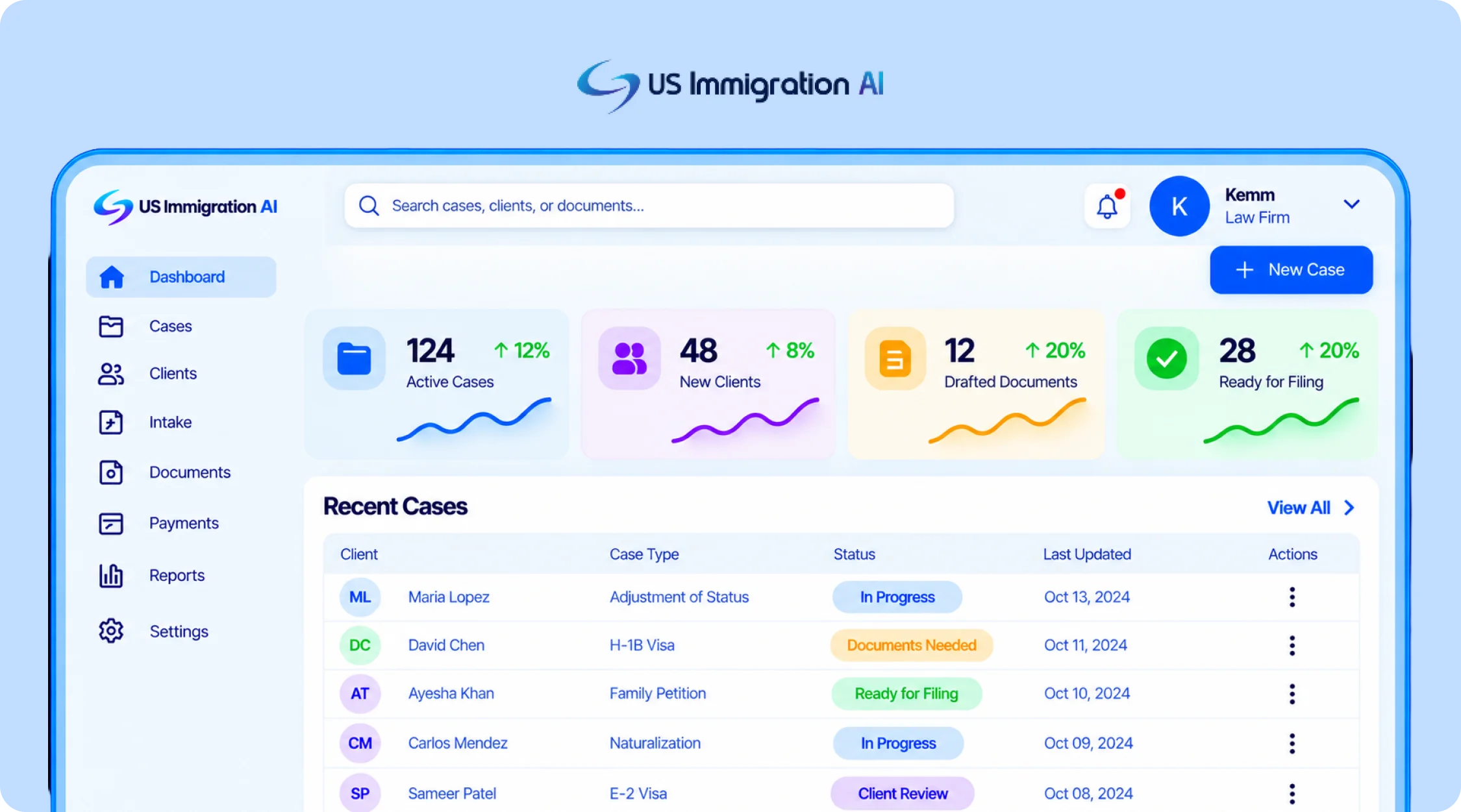
US Immigration AI is an AI-powered platform built specifically for immigration law firms. One of its co-founders, Michael Ashoori, is a U.S. immigration lawyer, and the platform is designed around the workflows immigration practices handle every day. It connects lead intake, retainers and payments, document collection, legal drafting, and final case assembly in one system.
Its immigration-specific workflow is the main difference from tools focused primarily on forms or drafting. Firms can use the platform across multiple stages of a matter while keeping attorney review and approval at the final decision and filing stages.
2. Docketwise: Best for Immigration-Specific Form Automation
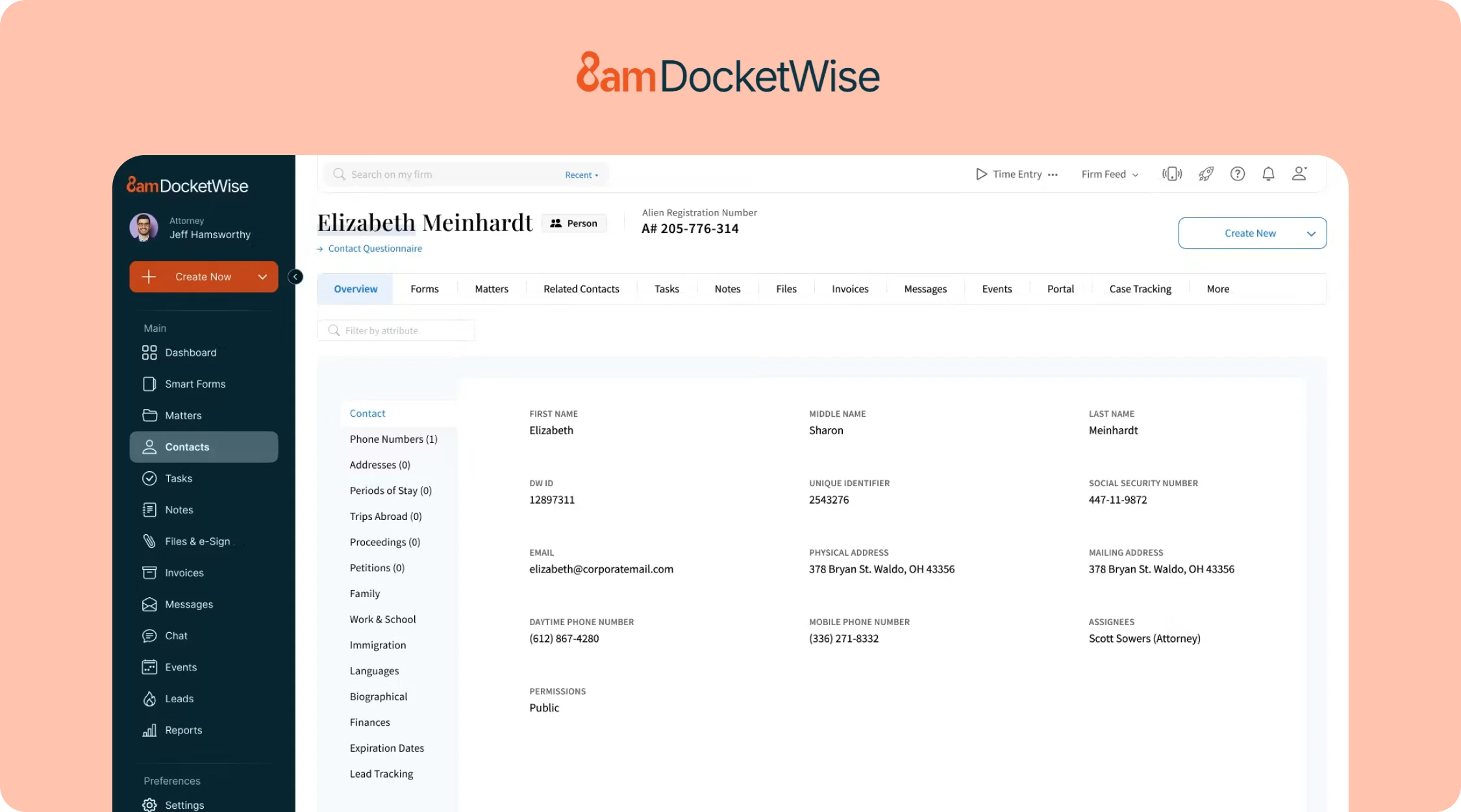
Docketwise is case management software built for immigration practices. Clients complete a smart questionnaire, and Docketwise auto-populates the matching form across a library of more than 150 USCIS, DOL, and DOS forms, from family petitions to PERM labor certifications.
Its AI writing layer, marketed as 8am IQ, adds drafting and data-capture assistance on top of the core form automation. Published pricing for it varies widely across review sites, so confirm the current rate directly rather than trusting any single listing.
3. CaseBlink: Best for AI-Drafted Petitions and RFE Responses
CaseBlink is a drafting tool built for immigration attorneys. It generates support letters, cover letters, RFE responses, and legal briefs for major visa and green card categories, citing directly to the case documents a firm uploads.
Pricing is not publicly listed at the time of writing, so request a quote directly rather than relying on a third-party estimate.
4. Sonix: Best for AI Transcription and Translation
Sonix transcribes and translates audio and video, with support for more than 49 languages. Immigration firms use it for client interviews, sworn statements, and hearing recordings that need an accurate written record in a second language.
Time a transcript of an actual client interview against step four of the test above before committing to a volume tier.
5. ChatGPT, Claude, and Gemini: Best for Research and Brainstorming
General-purpose AI chatbots like ChatGPT, Claude, and Gemini are useful for talking through a hard legal question, drafting a rough first outline of an RFE response before a specialized tool takes over, or summarizing a long article. They have no memory of a specific client's case and no built-in connection to a firm's intake or document data.
Client case details should stay out of the consumer tier. An enterprise tier with different data-handling terms is the safer choice if any client information is involved.
6. Clio's Manage AI: Best if Your Firm Already Runs on Clio
Clio's Manage AI, built into Clio Manage, extracts deadlines from uploaded court documents into calendar events, drafts client update messages, and summarizes long matter files. Extracted dates are shown side-by-side with the source document so staff can verify them before anything is confirmed.
It's a general practice-management layer, not one built specifically for immigration filings, and it's an add-on rather than a standalone product. Confirm both the AI-layer cost and the base subscription tier directly before budgeting.
How to Choose an AI for Your Immigration Practice
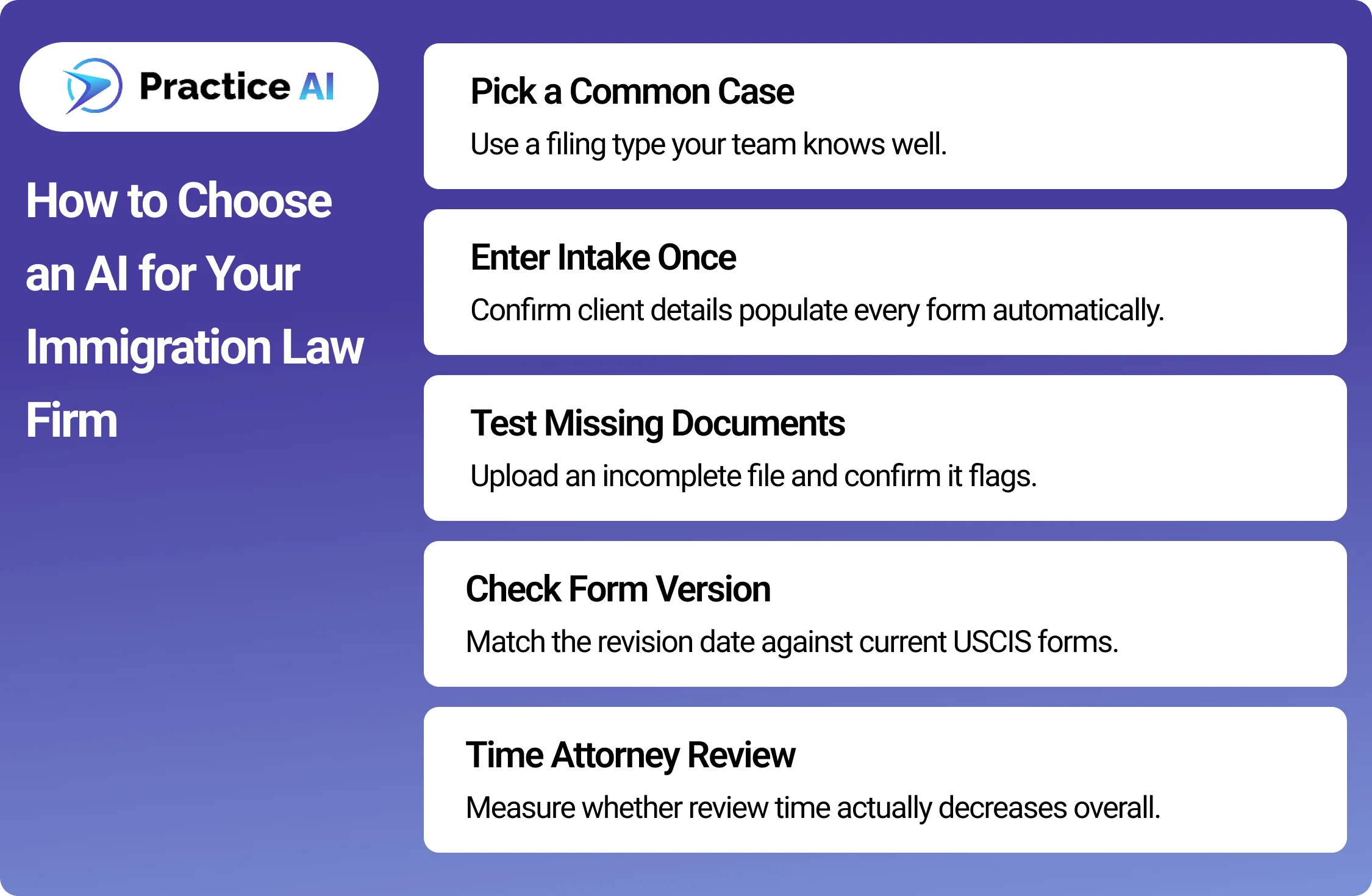
A demo shows you the tool at its best. A real case shows you how it behaves on your firm's actual work. Before signing, run one sample case through the tool and check these steps.
Pick one case type your firm files often. A family-based petition or a common nonimmigrant visa works well, since you already know how long it should take.
Enter the client's intake answers once. Check whether the same name, dates, and details carry into every downstream form without retyping.
Upload one file on purpose left incomplete. Confirm the tool actually flags the missing document instead of letting the gap pass silently.
Ask for the form's exact revision date. Compare it against the current edition on USCIS.gov to confirm the template is current, not stale.
Time your attorney's review of the sample output. A tool that saves drafting time but doubles review time has not saved your firm anything.
If the tool touches client payments, send one sample deposit. Confirm it lands in a trust account and that processing fees come out of the operating account instead, not the other way around.
Where Ethics Rules Actually Limit Your Options
None of the categories above operate outside your existing ethical duties. Three sources set the real limits on how any of them can be used.
ABA Formal Opinion 512
ABA Model Rule 1.1 requires competence, which the ABA's Standing Committee on Ethics and Professional Responsibility applied directly to generative AI in Formal Opinion 512, "Generative Artificial Intelligence Tools," issued July 29, 2024.
The opinion states that uncritical reliance on AI output carries real malpractice risk, and it ties AI use back to Model Rule 1.6 on confidentiality, since client data fed into a tool has to stay protected the same way a paper file would. A tool with no attorney-review checkpoint, or that cannot say where client data is stored, creates exactly the exposure the opinion warns about.
EOIR Policy Memorandum PM 25-40
Immigration practice carries one more layer. The Executive Office for Immigration Review's Policy Memorandum PM 25-40, "Use of Generative Artificial Intelligence in EOIR Proceedings," issued August 8, 2025, sets no blanket ban and no mandatory disclosure rule for AI use in immigration court and BIA proceedings.
It does warn that filing hallucinated AI-generated citations or arguments can trigger professional-conduct sanctions, and individual judges may still adopt their own standing orders on AI disclosure. Firms filing with EOIR should read the memo directly and check with the specific court or judge rather than assuming one uniform rule applies.
ABA Model Rule 1.15, If Payments Are Involved
A third rule applies to any tool that touches client money. ABA Model Rule 1.15 requires lawyers to keep client funds, like retainer deposits, separate from the firm's own operating funds in a dedicated trust account.
Commingling trust and operating funds is one of the most common sources of bar discipline, so a payment tool needs to show exactly where a deposit lands, not just confirm that it was "processed." This is the reasoning behind the payment check added to the test above.
Bring all three sources with you when you run the test. A tool that cannot show you an attorney-review flag, a clear data-handling answer, or exactly where a payment lands has already failed the more important test, regardless of how it performs on speed.
Final thoughts
The best AI for immigration lawyers is the one that survives contact with a real case, not the one that ranks highest in a search result. Run the test on your own files, ask each vendor exactly where client money and data go, and match the tool to the actual bottleneck slowing your firm down.
Category fit, a live test, and the three ethics sources covered here matter more than any single feature list a vendor publishes about itself.
Frequently Asked Questions
These are the questions immigration firms ask most when they're choosing between these tools.
What is the best AI for small immigration law firms?
US Immigration AI and Docketwise are strong options for small immigration firms because both can scale without a large upfront software investment. US Immigration AI is better suited to firms that want broader workflow automation, while Docketwise is stronger for forms management.
What is the best AI for solo immigration attorneys?
US Immigration AI can be a good fit for solo immigration attorneys because its per-application pricing lets firms pay based on actual case usage. This works well for solo attorneys with lower or more variable case volume.
How do I know if a vendor's claims about their AI tool are accurate?
Run the tool on one real case before signing anything. Enter intake data once, leave a document intentionally incomplete, and check whether the tool actually flags it. A live test on your own case type tells you more than any published feature list.
Is it safe to use general AI chatbots like ChatGPT for immigration cases?
General chatbots can help with brainstorming and rough drafts, but they were not built with legal confidentiality obligations in mind. ABA Model Rule 1.6 and ABA Formal Opinion 512 require firms to understand how a tool handles client data before putting case details into it.
Does an attorney still need to review AI-drafted immigration documents?
Yes. ABA Formal Opinion 512 states that uncritical reliance on AI output carries real malpractice risk under the competence duty in Model Rule 1.1. Every AI-drafted document should go through a licensed attorney's review before it reaches a client or the government.
Can AI be used in immigration court filings?
Yes. The Executive Office for Immigration Review's Policy Memorandum PM 25-40 neither bans generative AI in its proceedings nor requires firms to disclose using it. It does warn that filing hallucinated AI-generated citations can trigger professional-conduct sanctions, and an individual judge may still impose their own disclosure rule through a standing order. Confirm the specific court's practice before relying on any AI tool in a filing.
Does an AI payment tool create any special ethics risk?
Yes, if it touches client retainer money. ABA Model Rule 1.15 requires client funds to stay in a separate trust account from the firm's own operating funds. Before relying on any payment automation, confirm it actually keeps those two accounts separate rather than just processing a charge.
Drafting demand letters is a crucial yet time-consuming task for personal injury lawyers and lemon law lawyers. While manual drafting allows for full control, it comes with significant challenges, from inefficiencies to inconsistencies. Practice AI™, an AI-driven platform providing legal automation solutions, offers AI Demands™, an AI-powered demand letter tool that streamlines this process, making it faster, more reliable, and legally compliant.
Let’s compare the two approaches by exploring the challenges of manual drafting and the advantages of AI-driven automation.
10 Challenges of Manual Demand Drafting (That AI Demands Solves)
Time-Consuming Process
Crafting a detailed personal injury demand letter or lemon law demand letter can take hours, especially when pulling medical records, police reports, and legal references.
AI Demands: Automates AI demand letter generation in minutes, allowing lawyers to focus on case strategy.
Risk of Human Error
Mistakes like missing key case details, incorrect calculations, or outdated legal language can weaken a demand.
AI Demands: Ensures accuracy by integrating verified legal frameworks and structured templates.
Inconsistent Letter Quality
Demand letters vary depending on who drafts them, junior associates, paralegals, or lawyers.
AI Demands: Maintains high-quality, standardized formatting across all letters.
Difficulty Keeping Up with Legal Changes
Laws and precedents evolve, making it easy to miss crucial updates.
AI Demands: Regularly updates to reflect current legal AI solutions and standards and ensure compliance with the latest statutes.
Repetitive Workload for Similar Cases
Drafting personal injury demand letters for common claims (e.g., auto accidents) and lemon law cases involves repetitive work.
AI Demands: Uses case-specific templates to auto-populate relevant details, reducing manual effort.
Limited Scalability
Law firms handling high case volumes struggle to keep up with demand letter production.
AI Demands: For those looking for an AI legal document generator free of manual inefficiencies, AI Demands provides automation while maintaining accuracy and compliance, enabling firms to scale efficiently without needing additional staff.
Formatting and Structuring Issues
A poorly structured legal demand letter may lack persuasive impact.
AI Demands: Generates well-structured, organized AI-powered demandletters optimized for settlement negotiations.
Overlooking Key Case Elements
Rushing through manual drafts can lead to missing medical expenses, future damages, or pain and suffering claims.
AI Demands: Ensures all essential legal elements are included.
High Labor Costs
Lawyers and staff spending hours on manual drafting increases operational costs.
AI Demands: Cuts down labor time, improving firm profitability.
Delayed Settlements Due to Slow Drafting
Prolonged demand letter drafting timelines slow down settlement negotiations.
AI Demands: Speeds up demand letter generation, helping cases move forward faster.
How to Draft a Demand Letter? Let Practice AI™ Do It for You!
While manual drafting has its advantages, the inefficiencies outweigh the benefits for most personal injury and lemon law firms. AI Demands offers a fully-AI demand generation solution, combining AI-powered legal writing automation with legal precision to streamline demand letter drafting, reduce errors, and accelerate settlements.
Sign up with Practice AI now and explore AI Demands to revolutionize your demand letter drafting process!